

Stop Missed Patient Follow-Ups: A Care Coordination Guide
As practices scale, many care teams (and their patients) run into a version of this problem. An abnormal lab result lands in a shared inbox, everyone assumes someone else handled it, and weeks later a frustrated patient calls to ask why nobody reached out.
Missed follow-ups can happen in the gaps between people and systems, like in the example above. A systematic review of 19 studies in the Journal of General Internal Medicine found that ambulatory practices failed to follow up on 6.8% to 62% of lab results and up to 36% of radiology reports, depending on the study, and linked those misses to delayed and missed diagnoses.
Because missed follow-ups are a process problem, you can design a process that catches them. This guide walks through how to build a closed-loop patient follow-up workflow, from the moment a follow-up is created to the moment it's confirmed done. You'll see how to assign clear owners with care team task management, track every open item, automate the routine outreach that tends to stall, and pick care coordination tools that support the system instead of adding more tabs to check.
What a closed-loop patient follow-up workflow looks like
Quick Answer: A closed-loop patient follow-up workflow tracks each follow-up from the event that creates it to documented proof that it's done. Nothing counts as closed until someone confirms the patient got what they needed.
Most practices have a care coordination process on paper, but the trouble starts at the handoffs. In an open-loop process, sending something is the last step: the referral goes out, the result gets routed, the voicemail gets left. In a closed-loop process, sending is the middle step - the loop only closes when someone confirms the outcome and records it.
A patient follow-up workflow that closes the loop usually has five stages:
- Trigger: something creates a follow-up, like a lab or imaging result, referral, discharge, missed appointment, patient message, or a form response that needs review.
- Assign: the follow-up gets one named owner, a due date, and a priority level the moment it's created.
- Act: the owner contacts the patient, specialist's office, or lab, and logs each attempt.
- Confirm: the owner verifies the outcome. The patient knows their result, the referral appointment is booked, or the specialist's notes are back.
- Close and document: the follow-up is marked resolved with the outcome saved to the patient's record.
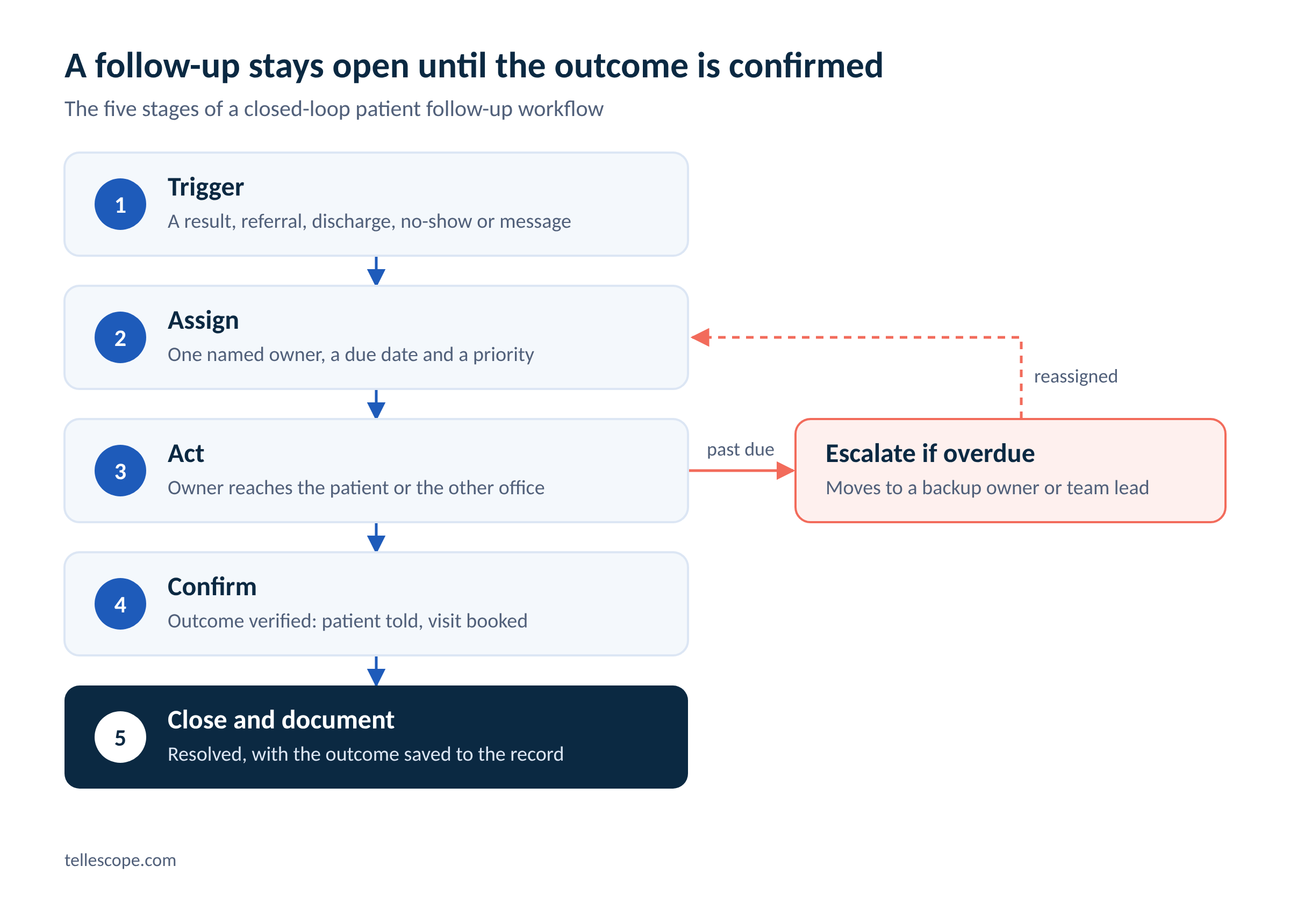
One more step holds the loop together: escalation. When a follow-up passes its due date, it moves to a backup owner or a team lead instead of sitting untouched in someone's queue. That rule is what turns a care coordination workflow from a good intention into a safety net.
The rest of this guide covers how to support each stage, starting with ownership.
Care team task management: give every follow-up an owner
Quick Answer: Every follow-up needs one owner, a due date, and a priority level. Care team task management turns follow-ups from inbox messages into assigned tasks, so nothing depends on someone remembering to check.
Shared inboxes feel collaborative, but they can spread responsibility thin. When a message is visible to five people, each one can reasonably assume another person is addressing it. And it gets worse as patient volume increases. A JAMA Network Open study of a New England ambulatory network found that patient medical advice requests to primary care physicians rose from an average of 1.8 to 3.9 messages per day during the first 15 months of the pandemic. The authors pointed to workflow redesign and team-based inbox management as priorities to address first.
Good healthcare task management fixes this by making ownership visible. Here are some strategies you can incorporate today:
- One owner per task: a team can share a queue, but each follow-up gets a single named person responsible for closing it.
- Due dates by follow-up type: work with your clinical leadership to set standard timeframes for each type, such as abnormal results, routine results, referrals, and post-visit check-ins.
- Priority levels: urgent items rise to the top of the queue instead of getting sorted by arrival time.
- Routing rules: send tasks to the right role, department, or licensed provider automatically. Teams that route patient messages this way spend less time triaging by hand, as we covered in our post on AI Decisioning for patient message routing.
- Coverage for time off: when an owner is out, their open tasks move to a backup owner instead of waiting for them to return.
- Internal notes on the task: context stays with the follow-up, so a handoff doesn't mean starting over.
General project tools like spreadsheets or task boards can work at a very small scale, but they don't show patient history next to the task. They also raise questions about where protected health information is stored. A care team task management tool built for healthcare keeps the task, the patient's record, and the conversation in one place on HIPAA-compliant infrastructure.
Patient tracking: know where every follow-up stands
Quick Answer: Patient tracking gives your whole team one view of every open follow-up, its status, and how long it's been waiting. Clear statuses and aging alerts surface stuck items before they become missed ones.
Ownership tells you who's responsible, but tracking tells you whether it's actually moving. Start with a short, shared set of statuses so everyone reads a task the same way:
"Waiting on someone else" is the status where follow-ups most often stall, because it looks handled. Give it its own due date and a reminder to check back.
A few habits make a patient tracking system useful day to day:
- Sort by age: a view of follow-ups ordered by days open shows what's aging out faster than a view sorted by name.
- Flag overdue items automatically: an alert or escalation at the due date is more effective than a weekly manual review.
- Define "resolved" for each follow-up type: for an abnormal result, that might mean the patient was notified and the next step is scheduled. Write these definitions down with your clinical team.
- Pull status from the source: when results, orders, and appointments sync from your EHR, the tracker updates on its own. If you use an EHR, ensure your task management tool integrates with it so incoming results can create or update follow-up tasks without double entry.
Once statuses are consistent, you can measure the loop itself. Track how long follow-ups take to close, how many are overdue at any time, and how open work is spread across owners. Those three stats show where your patient tracking process needs attention.
Automate the follow-up steps that tend to stall
Quick Answer: Automation handles the repetitive parts of a patient follow-up workflow, like creating tasks, sending reminders, and rebooking missed visits. That frees your team for the follow-ups that need clinical judgment or a personal touch.
A lot of follow-ups slip not because they’re hard, but because they're routine. They often don’t need a clinician's judgment, but they do need to happen on time, every time, and that's where people get stretched thin.
Here are the follow-up steps that can be strategically automated:
- Creating tasks from events: a new lab result, missed appointment, an unfinished intake form, or a referral that still isn't scheduled after a set number of days can each open a task with an owner and a due date.
- Reminders and confirmations: appointment reminders, prep instructions, and "we haven't heard from you" nudges can go out by text, email, or phone on a schedule.
- No-show and cancellation outreach: a missed or canceled visit can trigger outreach to rebook the patient the same day, before the gap turns into a lost patient.
- Care plan check-ins: when a patient goes past their expected visit cadence without booking, an automated check-in can bring them back.
- Escalation: overdue tasks can move to a backup owner without anyone having to spot them first.
Certain steps should still be managed by your team, like conversations about abnormal results, clinical decisions, and anytime a patient asks to speak with a care coordinator.
The rule that makes automation safe is visibility. Every automated message, call outcome, and booking should land back in the patient's record, so staff can see what happened and jump in at any point if necessary. Automation that runs in a separate tool just creates a new place for follow-ups to get lost.
If you're not sure where to start, pick one high-volume follow-up type with clear rules, like no-show rebooking. Automate it, then compare how long those follow-ups take to close before and after automation.
Patient follow-up best practices checklist
Quick Answer: The best patient follow-up processes create tasks automatically, give each one an owner and a deadline, escalate anything overdue, and only close a task once the outcome is confirmed and documented.
Use this list to check your current care coordination process against the basics:
- Create follow-ups automatically: results, referrals, discharges, no-shows, and flagged form answers should generate a task without anyone manually creating it.
- Assign one owner and a due date to every follow-up: no task sits in a shared queue without a person assigned to it.
- Standardize due dates by type: set timeframes with your clinical leadership and apply them consistently.
- Escalate overdue tasks: past-due items move to a backup owner or team lead automatically.
- Give "waiting on someone else" its own reminder: tasks waiting on a lab, specialist, or patient need a check-back date.
- Define "resolved" for each follow-up type: sending a message or leaving a voicemail doesn't count as closing the loop.
- Log every attempt and outcome: each call, message, and result belongs in the patient's record for continuity and an audit trail.
- Tell patients what to expect: let them know when they'll hear from you and how to reach you if they don't. A patient portal where they can see results and message the team gives them a convenient and reliable way to follow up.
- Review your stats weekly: look at overdue counts, time to close, and workload by owner.
- Audit a sample of closed tasks: spot-check that "resolved" really means resolved.
Tools that support a closed-loop system
Quick Answer: Look for care coordination software that turns incoming results, messages, and referrals into owned tasks, automates routine outreach, syncs with your tools, and keeps a full history on each patient's record. HIPAA-compliant infrastructure is the bare minimum; workflow fit is what sets tools apart.
A process on paper only works if your tools set you up for success. When you compare care coordination platforms, check for these capabilities:
- Tasks created from real events: messages, form submissions, phone requests, and lab results should become tasks automatically.
- Routing and priority: tasks go to the right person, department or specialty, with urgent items flagged as a priority.
- Status tracking and escalation: every task has a status, due date, and rule for what happens when it's late.
- Patient context in one place: the task sits next to the patient's history, conversations, and documents.
- Automated outreach with a clean handoff: routine calls and texts run on their own, and every outcome is logged where staff can see it and step in if needed.
- EHR and partner integrations: results, appointments, and notes flow in without double entry.
- Reporting: you can see turnaround times and open workload by owner without digging through spreadsheets.
Tellescope's care team task management is built around this loop. Patient messages, form submissions, and phone requests become tickets that teams can route by department or specialty, prioritize, and resolve. Each resolution is logged in the patient's profile for a full audit trail, and workflow automation can create tasks from patient data, such as a result coming in or an appointment being missed.
For the outreach itself, especially phone calls and SMS, Tellescope partners with Puppeteer AI. Puppeteer’s new revenue-recovery platform, Recupra, deploys HIPAA-compliant AI agents that each own one follow-up gap, and only count it closed when the patient actually rebooks or shows up:
- The No-Show Agent calls patients within 24 hours of a missed visit to reschedule.
- The Reminder Agent confirms upcoming visits by text or voice, catching no-shows before they happen.
- The Follow-Up Agent watches patients mid-care-plan and reaches out when someone has no next visit booked or passes their typical cadence without rebooking.
- And the Waitlist Agent offers newly opened slots to patients on the waitlist as soon as a cancellation frees one up.
Recupra connects to the clinic’s existing workflow, books directly into the EHR, and tracks the outcome of every call, so staff see what happened and step in only when a patient needs a human.
For care teams, that means these follow-ups get handled automatically, while staff still see the outcome of every patient they reach. You can learn more about how Recupra and Tellescope work together here.
Integration partners extend the loop past your own team. Tellescope’s native EHR integrations with athenahealth, Elation Health, Canvas Medical, Healthie, DrChrono, and Medplum keep results and appointments in sync. You can browse the full list on our integrations page.
Octave's care navigation team is a good example of how this shift can happen. Before Tellescope, the team tracked clients across spreadsheets and disconnected tools. After moving to one shared system, they spent less time searching for tasks and gained clearer visibility into caseloads, ticket turnaround, and team performance. You can learn more about Octave’s care team transformation here.
Level up your task management with Tellescope
Missed follow-ups are rarely one person's mistake. They come from processes where ownership is shared by everyone and nobody's tracking how long tasks stay open.
A closed-loop approach to care coordination fixes those gaps one at a time. Create follow-ups automatically, give each one an owner and a deadline, track status until the outcome is confirmed, and let automation handle routine outreach so your team can focus on the conversations that need a human touch.
If you want to see how this works in practice, book a demo of Tellescope's care team task management and we'll walk through how follow-ups get created, routed, and closed in your workflow.


Learn more about Tellescope
Be up-to-date with the latest digital health resources