

AI Decisioning: Smarter Patient Message Routing
If you've ever watched a billing question sit in a shared inbox for a day because it had to get read and forwarded by a nurse first, you already know the problem AI Decisioning solves.
AI Decisioning is the newest step in Tellescope's workflow automation, and it's one of our AI features we're most excited about right now. It reads an incoming patient message, figures out what it's about, and routes it to the right person automatically, no manual triage required.
About AI Decisioning
Quick Answer: AI Decisioning is a new step you can add to any Tellescope journey. It reads an incoming patient message, decides what it's about, and automatically routes it to the right person or team, no manual triage needed.
If you're already using journeys and triggers to automate patient communication in Tellescope, AI Decisioning will feel familiar. It's a new step you can drop into any journey that starts with an incoming message trigger, whether that message comes in by SMS, email, or chat.
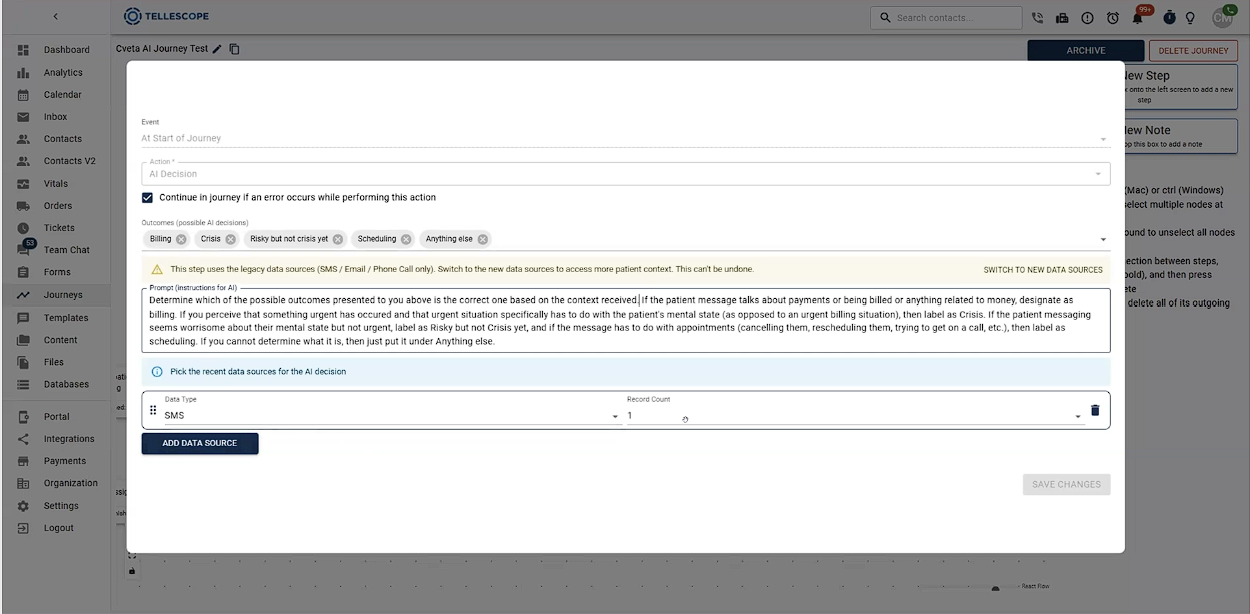
Here's how it works: when a patient's message comes in, it triggers a journey and lands on the AI Decision step. You give that step a prompt written in plain language, for example, “If this message is about money or payments, route it to billing.” The prompt can be as simple or as detailed as your practice needs.
You can also tell it how much conversation history to review before making a call, and that matters more than you’d expect. A lot of incoming messages are short and don't carry much context on their own. A reply that just says “Okay” doesn't mean much without seeing what it's responding to, so AI Decisioning can look back at the last several messages in the thread to understand what's actually being asked.
From there, you set up outcomes the same way you already do for tickets. Each outcome maps to an action, like assigning an inbox item to your billing team instead of the default care team. That means a billing question no longer has to land on a doctor or nurse's plate before someone forwards it along. It goes straight to where it needs to go, right from the start.
Key Highlights
- Plain-language routing logic: write your prompt the way you'd explain it to a new team member. There's no rigid if/then tree to build out.
- Context-aware decisions: set how many prior messages AI Decisioning should review, so short or ambiguous replies still land in the right place.
- Ticket-style outcomes: define outcomes the same way you already do for tickets, and map each one to a specific action, like assigning an inbox item to specific team members with a “billing” tag.
- Fewer unnecessary handoffs: messages route straight to the right department instead of hitting the default care team first.
- Works across channels: SMS, email, and chat messages can all trigger the same AI Decision step.
Built for Care Teams Managing High-Volume Patient Messages
Quick Answer: AI Decisioning is built for care teams whose message volume has outgrown manual triage, so questions about billing, scheduling, or care reach the right person without a staff member reading and forwarding every message first.
Most care teams don’t set out to build a message triage system, but that's what manual sorting turns into once patient volume grows. Someone opens the inbox, reads a message to figure out what it's about, and forwards it to whoever should actually handle it. Do that hundreds of times a week, and that creates a lot of time spent reading messages and less time focusing on actual patient care.
This isn't a small or shrinking problem, either. A 2026 study published in JAMA found that patient-authored portal messages rose 153% between 2020 and 2025, based on an analysis of more than 8 billion patient-provider interactions across upwards of 2,000 health systems. The study was direct about what that means operationally: healthcare teams need to rethink inbox workflows, not treat them as an after-thought.
A lot of that reading and forwarding happens with messages that don’t even pertain to clinical questions. The American Medical Association estimates that roughly three-quarters of patient portal messages are about topics like appointment logistics, fax requests, or refills; questions that don’t need to be answered by a physician or nurse. When that sorting has to happen manually, message by message, it's a big part of why physicians report spending up to two hours some nights just working through their inbox.
This process slows patients down, too. A billing question that has to pass through a clinical team member before it reaches billing takes longer to resolve than it should, and that kind of delay is the sort of thing patients notice.
AI Decisioning is built for teams in that spot: care teams fielding a steady mix of billing, clinical, and administrative questions through SMS, email, or chat, where the same handful of people end up reading everything before it gets to the right place.
It's also a good fit if you're evaluating AI-native platforms and want routing logic that goes beyond simple keyword matching. Because AI Decisioning reads messages in context instead of scanning for exact phrases, it can pick up on what a patient means even when they don't use the “right” words.
How to Get Started
If you're already a Tellescope customer, AI Decisioning is live. Open any journey that starts with an incoming message trigger, add the AI Decision step, write your prompt, and set your outcomes. No code and no engineering ticket required.
If you're new to Tellescope and evaluating AI-native platforms for patient communication, this is a good place to start the conversation. Book a demo to see AI Decisioning running on a real workflow, along with the rest of what Tellescope's CRM can automate for your care team.

Learn more about Tellescope
Be up-to-date with the latest digital health resources