


AI Form Response Summary: Faster Reads on Patient Submissions

Many providers understand the stress of having to quickly read a patient's intake form minutes before the visit starts. That’s not an ideal way to prepare for appointments, and it’s the reason why we developed AI Form Response Summary in Tellescope.
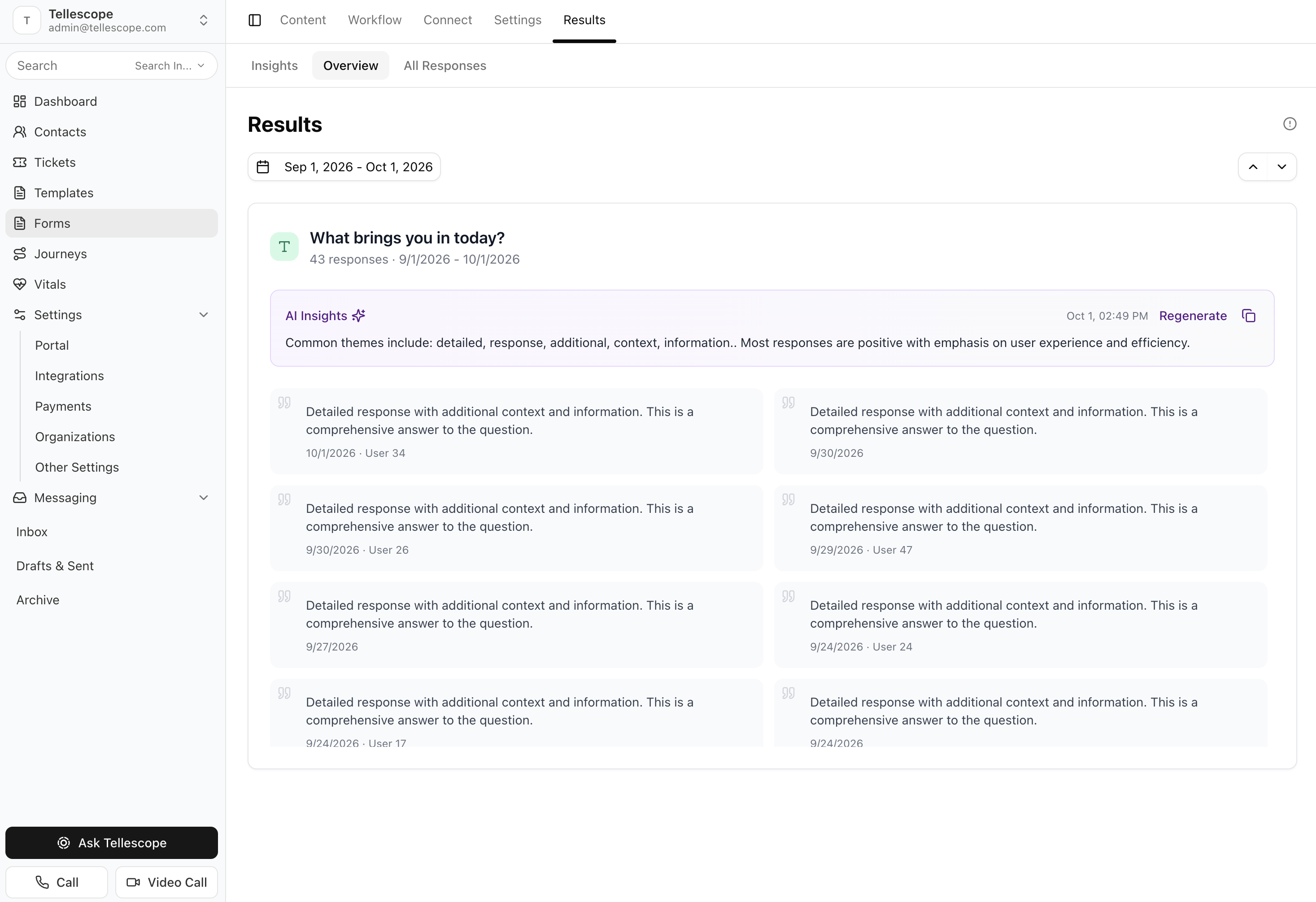
AI Form Response Summary is the latest AI feature in Tellescope's form builder. In the platform, you'll find it as the "Summary of Submitted Responses" setting on any form. When it's turned on, the patient's answers get summarized and shown on their timeline, and that summary sits at the top of every form. This allows providers to quickly understand what the patient reported before they begin reading each response.
About AI Form Response Summary
Quick Answer: AI Form Response Summary is a setting you can turn on for any Tellescope form. It summarizes the patient's submitted answers, displays that summary on their timeline and at the top of the form, and follows a prompt you write describing what the summary should focus on.
Here's how the setting is described inside Tellescope: "The patient's submitted answers are summarized and shown on their timeline. The answers are always included - you only need to describe what the summary should focus on."
Every submitted form answer is taken into account when developing this summary. Your prompt determines priority, which is where your clinical workflow comes in. A triage team might want urgency called out first. A medication management program might want the drug and allergy answers up top. And a behavioral health intake might want symptom severity front and center.
Here's how it works: a patient submits a form. A provider opens that form on the patient's profile, often from a ticket tied to an upcoming appointment, and the summary is already waiting at the top. Depending on the prompt you wrote, that summary can cover:
- What the patient reported, in the order of importance you defined.
- Symptoms and severity, as the patient described them.
- Medications and allergies mentioned in the answers.
- Gaps in the submission, like a required answer that was left blank or a symptom with no duration details.
Here's an example prompt a care team might use on a symptom check-in form:
And here's the kind of summary that prompt produces:
This allows the provider to quickly understand three things before the visit starts: what the patient is dealing with, what the patient is worried about, and which follow-up questions to ask first.
The summary serves as a starting point. If a provider wants more details, they can follow up with additional questions right there. Treat this part like any AI chat assistant, because that's exactly what's running behind the scenes. Tellescope uses Anthropic's Claude models to generate form summaries and answer follow-up questions.
Using the summary above, providers can ask for more information like, "Which questions did the patient leave blank?" or "Did the patient disclose any pre-existing conditions?"
It’s important to highlight that the summary doesn't replace the form. Providers can still view the original patient responses in full right below the summary.
Key Highlights
- Available on every form: turn it on for the forms your team reads most, like intake, symptom check-ins, or pre-visit questionnaires.
- Every answer is included: you don't need to configure data sources, so nothing the patient submitted gets left out of the summary.
- Prompt-driven focus: describe what matters clinically and each summary follows that structure, submission after submission.
- Calls out gaps: blank fields and missing details can be named directly in the summary.
- Easily accessible for your team: summaries appear on the patient's timeline and at the top of the form.
- Follow-up questions: ask about the submission the same way you'd use an AI chat assistant, without leaving the form page.
- Original responses stay put: the full set of answers are still there to review - nothing gets deleted or replaced.
Built for Clinical Teams With Tight Visit Schedules
Quick Answer: AI Form Response Summary was built for high-volume care teams where providers only have a few minutes before each visit to understand what a patient reported in their intake form.
We built this feature after hearing about a specific customer’s pain point. Their team runs around 700 appointments a day, and they wanted each patient to take about 15 minutes of clinician time: 2.5 minutes to prepare, a 10-minute visit, and 2.5 minutes to wrap up afterward. Asking physicians to read through a full set of form responses before every appointment wasn't going to fit in that window.
At that volume, small amounts of prep time add up fast. Two and a half minutes of review across 700 visits comes out to roughly 29 hours of clinician time every day. Double the prep to five minutes, and it's closer to 58 hours.
Five minutes is a realistic estimate for many care providers. A 2020 study in the Annals of Internal Medicine analyzed about 100 million outpatient encounters involving roughly 155,000 U.S. physicians. Physicians spent an average of 16 minutes and 14 seconds in the EHR per encounter, and chart review made up 33% of that time. That's a little over five minutes per encounter, about double the prep window our customer was aiming for.
An editorial published alongside that study noted that clinicians have shortcut tools for documentation and ordering, but not for reviewing what's already in a patient's record. AI Form Response Summary is meant to be that shortcut for the forms your team collects.
This feature can be a huge benefit for many providers, including telehealth practices, weight management programs, mental health teams, and remote patient monitoring programs - anywhere intake and check-in forms come in faster than your team can read them. It also helps with handoffs, since a care coordinator or covering provider can get the gist of a submission from a patient they haven't met yet.
Summaries are there to speed up review. Providers should still confirm key details in the original responses before making care decisions, and those answers are always right below the summary.
How to Get Started
If you're already a Tellescope customer, AI Form Response Summary is available on your forms today. Open the form you want to use, turn on Summary of Submitted Responses, and describe what the summary should focus on. There's no code involved, and you can adjust the prompt as you see fit.
If you're exploring AI-native platforms for patient care, book a demo to see AI Form Response Summary running on a real intake form, along with AI Decisioning and the rest of what Tellescope can automate for your care team.


Learn more about Tellescope
Be up-to-date with the latest digital health resources